Imgify: Batch Image Converter2.5.0
Publisher Description



Imgify - Image Converter & Watermark Tool
Transform your images with professional-grade conversion and watermarking tools, all in one powerful app.
Universal Image Converter
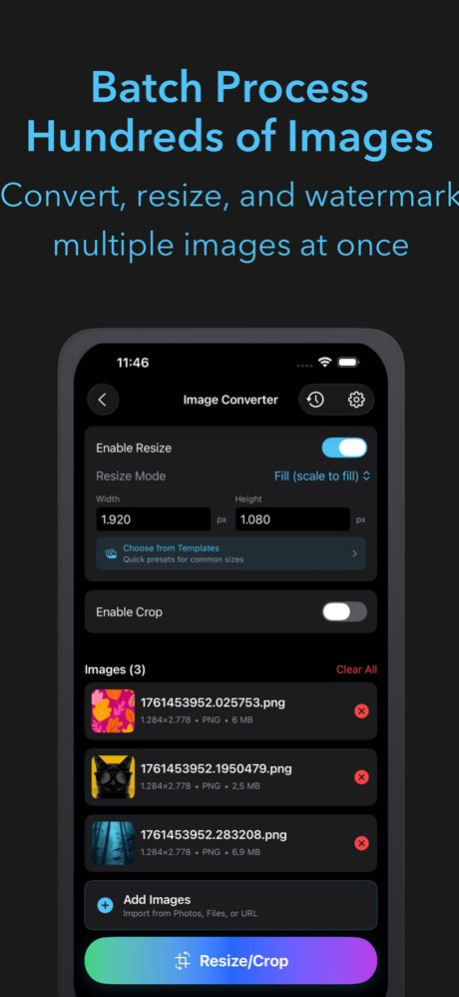
Convert between more than 11 image formats including JPEG, PNG, HEIC, HEIF, GIF, TIFF, BMP, ICO, and PDF. Batch process multiple images with customizable quality settings, resize options, and format-specific optimizations.
Smart Batch Watermarking
Add professional watermarks to your images with:
. Text Watermarks: Custom fonts, colors, backgrounds, and positioning
. Image Watermarks: Use your own logo or graphics
. Flexible Positioning: Nine position options from corner to center
. Batch Processing: Watermark multiple images simultaneously
. Live Preview: See exactly how your watermark will look
Advanced Features
. Multiple Import Options: Photos library, Files app, URL input, or clipboard
. Intelligent Format Detection: Automatically detects and preserves image metadata
. Quality Control: Adjustable compression and optimization settings
. Resize and Crop: Smart resizing with multiple aspect ratio options
. Rotation and Flip: Complete image transformation tools
. History Tracking: Keep track of all your conversions and watermarks
. Export Options: Save to Photos, Files app, or share directly
Professional Results
. Lossless Conversion: Preserve image quality with advanced algorithms
. Transparency Support: Maintain PNG and GIF transparency
. Metadata Preservation: Keep EXIF data and creation dates
. Web Optimization: Optimize images for faster loading
. Batch Export: Process hundreds of images at once
Seamless Integration
. Files App Integration: Direct access to your iCloud Drive
. Share Sheet Support: Easy sharing to any app
. Drag and Drop: Intuitive file management
. Dark Mode: Beautiful interface that adapts to your system
Perfect for photographers, designers, content creators, and anyone who needs reliable image processing tools. Whether you’re converting RAW files, adding watermarks to portfolios, or optimizing images for web use, Imgify delivers professional results with an intuitive interface.
Download Imgify today and transform your image workflow.
Version History - Fully supports Simplified and Traditional Chinese 2.5.0 11/06/2025 - Support for batch resize, crop, and transformation
- Batch renaming
- Batch watermarking with QR codes
- Improved UI/UX and performance 2.4.7 10/28/2025 2.4.6 10/24/2025
About Imgify: Batch Image Converter
The company that develops Imgify: Batch Image Converter is Roxwin Vietnam Technologies Company Limited. The latest version released by its developer is 2.5.0.
To install Imgify: Batch Image Converter on your iOS device, just click the green Continue To App button above to start the installation process. The app is listed on our website since 2026-10-15 and was downloaded 0 times. We have already checked if the download link is safe, however for your own protection we recommend that you scan the downloaded app with your antivirus. Your antivirus may detect the Imgify: Batch Image Converter as malware if the download link is broken.
How to install Imgify: Batch Image Converter on your iOS device:
- Click on the Continue To App button on our website. This will redirect you to the App Store.
- Once the Imgify: Batch Image Converter is shown in the iTunes listing of your iOS device, you can start its download and installation. Tap on the GET button to the right of the app to start downloading it.
- If you are not logged-in the iOS appstore app, you'll be prompted for your your Apple ID and/or password.
- After Imgify: Batch Image Converter is downloaded, you'll see an INSTALL button to the right. Tap on it to start the actual installation of the iOS app.
- Once installation is finished you can tap on the OPEN button to start it. Its icon will also be added to your device home screen.
Program Details
System requirements
Download information
Pricing
Version History
version 2.5.0
posted on 2026-10-15
Version History - Fully supports Simplified and Traditional Chinese 2.5.0 11/06/2025 - Support for batch resize, crop, and transformation
- Batch renaming
- Batch watermarking with QR codes
- Improved UI/UX and performance 2.4.7 10/28/2025 2.4.6 10/24/2025
